Now you can include the whole content of a folder in a fact. Moreover, you can add new content in the folder directly from that fact. Please, proceed as follows in order to create a folder include:
(1) Factinclude the folder by clicking on the factinclude button  of the TinyMCE editor. of the TinyMCE editor.
(2) Then select a folder and add includeall="1" in the "OR enter manual options:" field
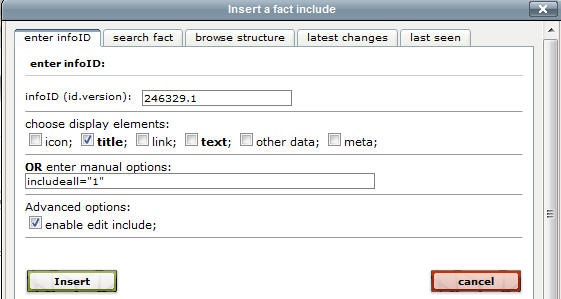
and click on "Insert".
(3) When you look at your fact you will see the folder`s content (if it is not empty) and an "add" button above the content. By clicking on this button, the template form will open and you will be able to publish your new content direcly in the folder.

For advanced users: Please, see also factinclude for folders and Create a factinclude of a folder for easy fact publishing in order to improve the functionality and to style the appearance.
|