logo1 - 1303794.1 balken1 - 1303802.1
logo2 - 1303798.1 balken2 - 1304793.1
line2 - 1303829.1
spacer_navi - 1303814.1 Über FCS | News | Handbücher | FAQ | Support Forum | FCS-Newsletter | Glossar | Kontakt >> Login

  Home > struktur > English > Manuals > User manual > Create content > Permission system > Easy form: assign permissions to groups
   Recent Changes (RSS 2.0) - factline community server


Easy form: assign permissions to groups
 

Normally, permissions are assigned to user groups.


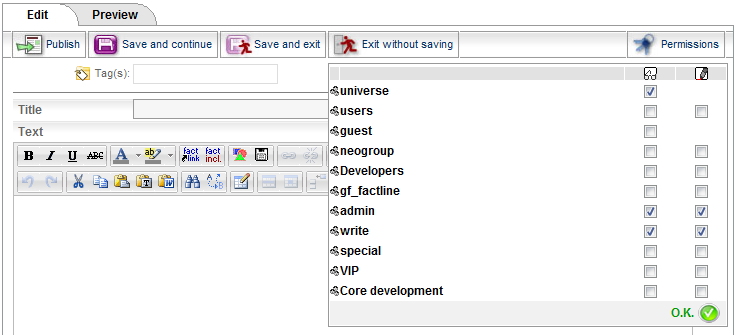
In order to assign permissions, proceed as follows:


(1)
Click/mouse over "Permissions" in the top right corner of the form, then click on  "change".

Easy form assign permissions to groups.png - 1421357.1


(2) If you create a fact in a folder, the permissions of the folder are suggested as permissions for the fact. Adapt the pre-selection according to your wished by clicking in the checkboxes (see picture above, point 2).

(3) In the legend, each icon is described. For detailed explanation on permissions, see chapter "Permissions".


Metainfo:AutorIn: Webservices GmbH factline
Copyright: factline Webservices GmbH
Publiziert von: factline factline
infoID: 1306727.7 (...Archiv) Publiziert am 14 Jan. 2010; 15:17
Anzahl der Zugriffe auf dieses fact: 123
 
Verknüpfungen:
struktur  >  English  >  Manuals  >  User manual  >  Create content  >  Permission system 
 
Verweis(e) (4):