logo1 - 1303794.1 balken1 - 1303802.1
logo2 - 1303798.1 balken2 - 1304793.1
line2 - 1303829.1
spacer_navi - 1303814.1 Über FCS | News | Handbücher | FAQ | Support Forum | FCS-Newsletter | Glossar | Kontakt >> Login

  Home > struktur > English > Manuals > P-admin manual > Configuration > Service permissions > Differing permission options for "factchat"
   Recent Changes (RSS 2.0) - factline community server


Differing permission options for "factchat"
 
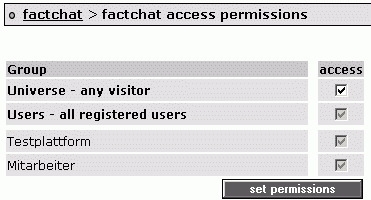
The service permissions for factchat greatly differ from the permission options of other services. There is no distinction between "read" and "write" permissions. Instead, you only need to determine which groups have access to the factchat and all its functionalities.


In order to set service permissions for "factchat", proceed as follows:


|1| Choose "Services" from the main menu by clicking on it.

|2| Click on the "perm."-button next to factchat.

|3|
You will see a list of all available groups on your platform.

factchat_perm - 159215.1


|4| Choose the groups which should be able to use the factchat.

|5| Save your settings by clicking on "Set permissions".


Metainfo:AutorIn: Astrid Holzhauser, CK
Copyright: factline Webservices GmbH
Publiziert von: factline Webservices GmbH
infoID: 161280.5 (...Archiv) Publiziert am 24 Aug. 2007; 07:53
Anzahl der Zugriffe auf dieses fact: 88
 
Verknüpfungen:
struktur  >  English  >  Manuals  >  P-admin manual  >  Configuration  >  Service permissions 
 
Verweis(e) (4):