|
By and by, more and more users will register on your platform. Whenever a user registers, he/she is automatically added to the "platform main group". However, if required, he/she needs to be assigned to an additional group or subgroup.

How do I know that a new user has registered? - The system can notify you via e-mail as soon as a new user has registered. For further details see chapter "Create/edit e-mail templates".
In order to add (new) users to one group or subgroup, proceed as follows:
|1| Choose "Groups & Users" from the main menu by clicking on it.
|2| Click on the “modify”-button in the row “Editing groups”.
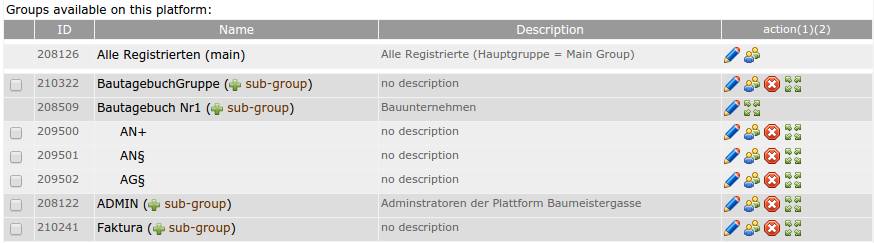
|3| Now, you see an overview of all groups. Click on the "Users" button  next to the desired group. next to the desired group.
|4| Now, you see all users who are already in this group. Click on the “add/search user”-link on the left side
|5| You can search for one particular user, for all users who have not been assigned to this group or for all users. "Search for users" starts the search.
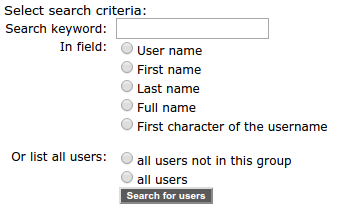
Important: With this search you will search only for users, that are registered on the specific platform. In order to add another users that are on the server, first you have to add them to the Platform Main Group . Important is that with the "add/search user"-link on the main group you will find users on platfoms, where you have pAdmin rights.
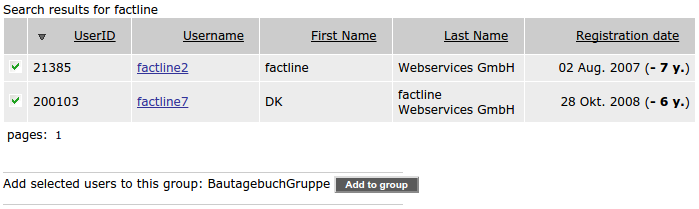
|6| You see a list of results. Users, who match your search request but have already been assigned to the group, are highlighted with a green check. Select one or more users with a click in the checkbox on the left and click on "Add to group.“
Please, pay attention to Functionality rules for master groups and subgroups.
Test users for the individual services - We recommend to register test users and to assign them to different groups.
This way, you can verify what users of a particular group can see.
(You can use the same e-mail address several times for registering testusers.)
|