
 |
|
|
|
Hide/display options area
|
|
| | |
|
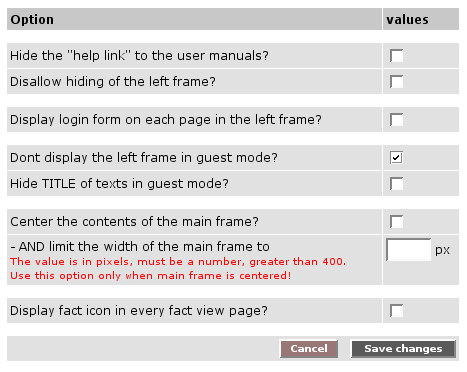
There is the possibility to hide the options area for users who are not logged in.
In order to hide the options area, proceed as follows:
|1| Choose "Interface" from the main menu by clicking on it.
|2| Click on the "modify"-button in the row "Interface options".
|3| Click in checkbox in the row "Dont display the left frame in guest mode?".
If required, it is possible to disallow the hiding of the options area.
Simply proceed as follows:
|1| Choose "Interface" from the main menu by clicking on it.
|2| Click on the "modify"-button in the row "Interface options".
|3| Tick the checkbox in the row "Disallow hiding of the left frame?".
|
|
|

 continue with:
  return to:
